A Unified Platform for the ACU STEM Centre for Education and Engagement
jon@place.technology
November 1, 2025
1.0 Executive Summary
1.1 Introduction
ACU's vision for the STEM Centre for Education and Engagement is clear: a space that is not only technologically advanced, but coordinated, responsive, and unified in how it operates. The goal is to create an environment that inspires curiosity, supports research and teaching, and provides seamless access to equipment and space — without requiring users to understand the systems behind it.
Today, the challenge is not the absence of good technology — ACU has invested in excellent building systems, enterprise Wi-Fi infrastructure, and AV environments. The challenge is that these systems operate independently, requiring manual effort to bridge the gaps between teaching, research workflows, visitor experience, compliance, and safety. In environments where hands-on learning and equipment usage are critical, these gaps create friction — and friction impacts participation.
PlaceOS is designed to remove that friction.
PlaceOS is a unified integration and automation platform that sits above existing building, AV, research lab, access, security, scheduling, and workflow systems. Rather than replacing infrastructure, we connect it — enabling one system to inform and trigger another, and creating configurable workflows that match how ACU wants the space to function. This provides a consistent, reliable experience for students, staff, researchers, industry partners, outreach visitors, and administrators.
This proposal outlines how PlaceOS enables:
- Real-time visibility and analytics of occupancy, utilisation, and environmental conditions
- Automated and user-friendly workflows for room access, lab induction, equipment eligibility, and teaching mode setup
- Integrated visitor management and event experience, from QR check-in to signage and directional guidance
- A unified campus app experience for booking, navigation, and user support
- Centralised monitoring for IT, AV, and Facilities teams, improving uptime and response time
- Local flexibility with global maintainability, ensuring the system can scale across ACU campuses
Crucially, the platform aligns with ACU's goals for:
Safety and Compliance
Support competency-based access to equipment, automated induction verification, and integration with training systems such as OnGuard or LMS credential records.
Inclusivity and Accessibility
Wayfinding, signage, and occupancy-based space recommendations ensure that people of all backgrounds, abilities, and familiarity with campus can participate confidently.
Sustainability and Efficiency
Real-time occupancy data informs HVAC and lighting adjustments, reducing energy consumption while maintaining comfort.
Industry & Community Engagement
Spaces become discoverable, bookable, safe, and welcoming to external partners — without creating burden on internal staff.
PlaceOS becomes the operating system of the built environment, ensuring all systems, data, and workflows support the shared purpose of the STEM CEE: to encourage participation, curiosity, and a sense of welcome.
1.2 The PlaceOS Vision: Beyond Siloed Solutions
The RFP outlines eight critical technology applications to be supported in the new facility. While these solutions can be sourced individually, this approach invariably creates data silos, exponential management overhead, and a disjointed user experience.
PlaceOS provides a superior alternative. Our solution is a single, open platform that serves as the "central nervous system" for the building. It is an integration and automation layer that connects all other systems, allowing them to communicate and act in concert.
1.3 A Single Platform, Multiple Core Applications
Our solution is comprised of three main components that work together to meet all RFP requirements:
The PlaceOS Core Platform
This is the foundational integration engine. It is a powerful, driver-based abstraction layer that connects, normalizes, and controls every third-party system in the building. This includes the specified Tridium Niagara BMS, Gallagher Access Control, Microsoft O365 calendars, and Cisco network infrastructure. The platform consists of open-source integration drivers, hot-swappable modules, and a decoupling of the front-end from the back-end.
PlaceOS Applications
Our turn-key products package logic, integration drivers and user interfaces. We have packages for AV (Stagehand), workplace (Workmate) and a suite of end-point interfaces (visitor kiosks, digital signage, booking panels). Furthermore, we have AI packages including a ChatGPT plugin and the ability to integrate your own AI backend (such as Azure Co-pilot). Our applications can be deployed locally or hosted by PlaceOS.
PlaceOS Customisation
The decoupling of back-end and front-end allows us to customise or build new interfaces that leverage our integrations. This could be different views of data for stakeholder groups, a student interface vs a teacher interface that shares many integrations. Our APIs enable you to do this internally, use your preferred web development partner, or engage with PlaceOS to collaborate on new user experiences across your building.
1.4 Key Benefits for ACU
Deep Integration and Automation
We will natively integrate all specified ACU systems, unlocking powerful automation workflows (e.g., linking room bookings to HVAC and access control) that are impossible with siloed products.
Future-Proof Architecture
Our "driver-based" model means ACU is never locked into a specific hardware vendor. If a sensor, display, or control panel is replaced in the future, PlaceOS simply updates the driver, not the entire platform.
Unmatched "Smart Campus" Expertise
PlaceOS is designed for the complexity of university environments, which simultaneously function as workplaces, lecture halls, research labs, and public venues. Our strategic alliance with UCLA provides a direct and relevant precedent for this project.
Australian-Based Support
With our headquarters and core support team based in Sydney, we provide local, expert support in ACU's time zone.
Occupancy-Based Cost Savings
One of the most compelling benefits of PlaceOS is the ability to drive significant operational cost savings through intelligent, occupancy-driven automation. By fusing real-time occupancy data from multiple sources (Wi-Fi, sensors, cameras), PlaceOS enables the STEM CEE to optimize HVAC, lighting, and other building systems based on actual usage rather than static schedules.
How It Works:
- Dynamic HVAC Control: Automatically adjust heating, cooling, and ventilation based on real-time occupancy and environmental conditions, reducing energy waste in unoccupied or lightly-used spaces.
- Smart Lighting: Dim or turn off lights in areas with no detected presence, while maintaining appropriate levels in active zones.
- Predictive Optimization: Use historical occupancy patterns to pre-condition spaces just before peak usage times, avoiding unnecessary energy consumption during off-hours.
- Load Balancing: Distribute occupants across available spaces to minimize the number of zones requiring full environmental control.
Real-World Impact: Organizations using PlaceOS typically see 20-30% reductions in energy costs while maintaining or improving occupant comfort. For a facility the size of the STEM CEE, this can translate to tens of thousands of dollars in annual savings.
2.0 The PlaceOS Solution: Platform Architecture and Integration
2.1 The PlaceOS Abstraction Layer
The primary challenge of the RFP is not simply finding a room booking application; it is finding a platform that can make a room booking application, a Building Management System (BMS), an access control system, and an academic timetabling system all speak the same language.
ACU has specified several best-in-class, disparate systems: a Tridium Niagara AX BMS for HVAC and lighting, Gallagher for access control, Microsoft O365 for ad-hoc meetings, and TimeEdit for academic timetabling. Individually, these systems are unaware of each other.
PlaceOS acts as the "abstraction layer" that unifies them.
How it works:
- We install Drivers that communicate in each system's native language (e.g., BACnet for Tridium, the Graph API for O365, the Command Centre API for Gallagher, and the TimeEdit API).
- These drivers create "digital twins" of each physical or logical asset (a room, a sensor, a calendar, a user) within the PlaceOS platform.
- We then build powerful, event-driven automation logic.
Example Automation Workflow:
- WHEN a booking is made in O365 or TimeEdit for a specific lab;
- THEN PlaceOS checks the real-time occupancy data from Cisco Wi-Fi to confirm the lab is empty;
- THEN PlaceOS tells the Gallagher module to grant the booker's mobile credential access for the duration of the meeting;
- AND PlaceOS tells the Tridium module to activate the "Meeting" HVAC and lighting scene 10 minutes prior.
2.2 Key Solution Components
- PlaceOS Core: The on-premise or private cloud integration engine that houses the drivers, logic, and core APIs.
- PlaceOS Applications: The user application for building users (staff, students, visitors), providing the unified mobile and web interface.
- PlaceOS Digital Signage: The platform for creating, managing, and scheduling content on all digital displays.
2.3 Off-the-Shelf Platform Applications
While PlaceOS is a platform first, it includes a suite of ready-to-deploy applications designed specifically for environments like ACU — where buildings serve many stakeholders with different modes of use.
2.3.1 Workmate — User Experience App
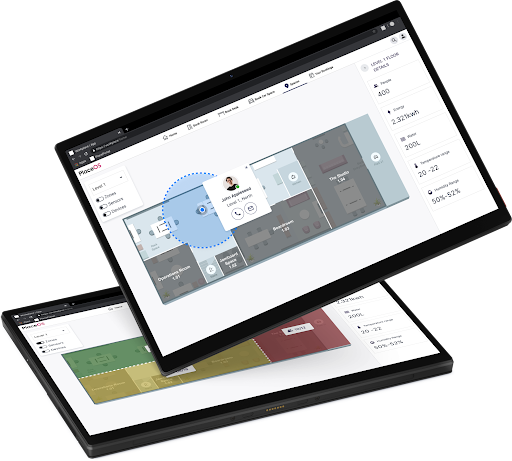
This solution is used extensively by global workplaces and can be tweaked for student experiences (and of course, be used by professional staff on campus).
Workmate provides the unified interface for:
- Room and lab bookings
- Desk and collaboration space bookings
- Wayfinding
- Visitor check-in, QR passes, and host notifications
- Live occupancy and "best space available now" recommendations
- Service request and issue reporting
- Digital notices and event discovery
- Carspace booking and managing
- Provides access control via the user's mobile device (native app required)
- Asset management and booking
- Catering requests and management
It includes a Concierge interface to manage requests, make changes to bookings and set rules and conditions on space.
2.3.2 Stagehand — Real-Time Support & Operations
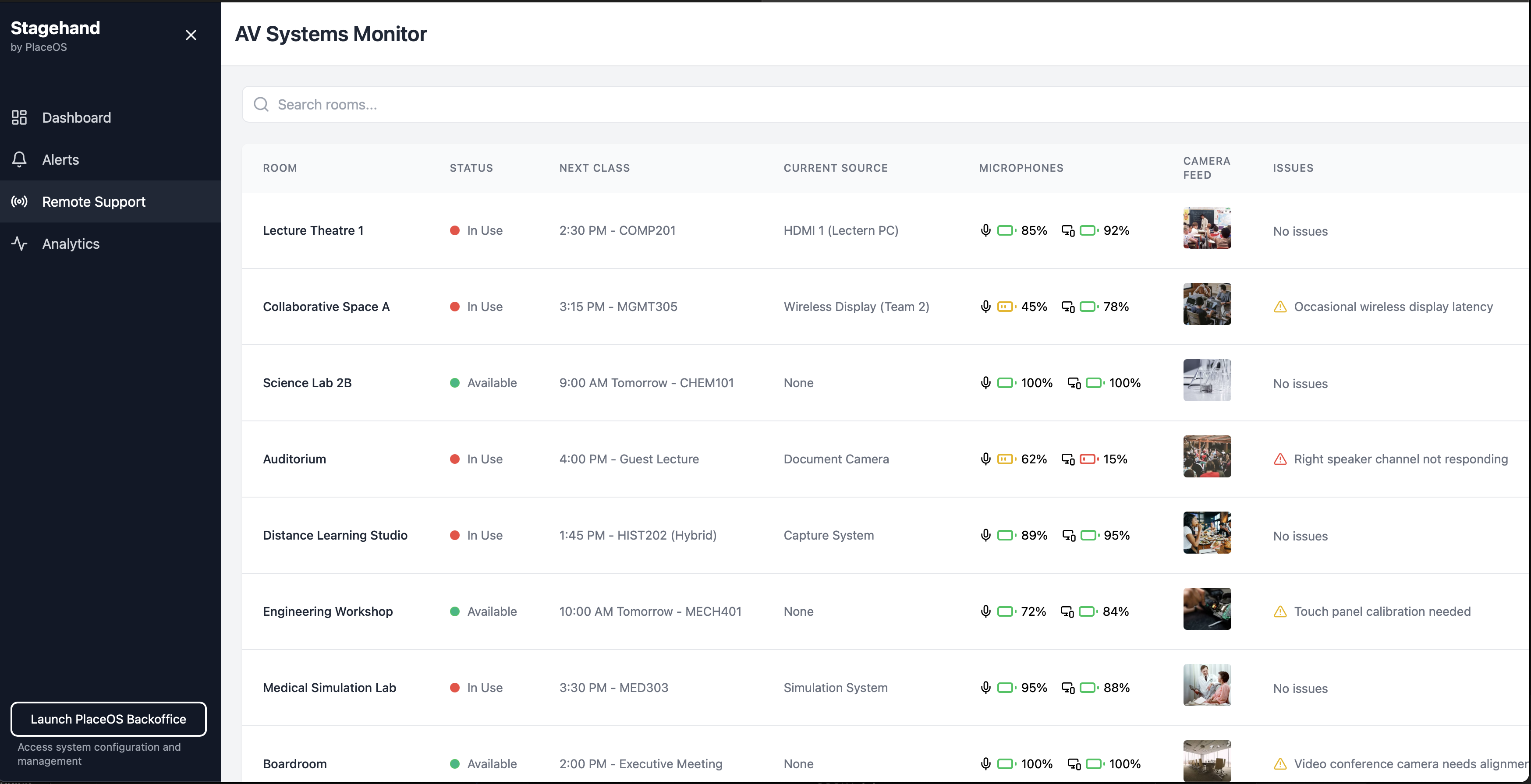
Designed for IT, AV, Facilities, and Operations teams.
- Real-time monitoring of rooms, devices, and building systems
- Remote AV control and reset
- First-level support troubleshooting tools
- System health, uptime, fault logging, and reporting
This reduces on-site technician workload, and increases uptime of shared facilities.
2.3.3 Backoffice — The Administration & Configuration Layer
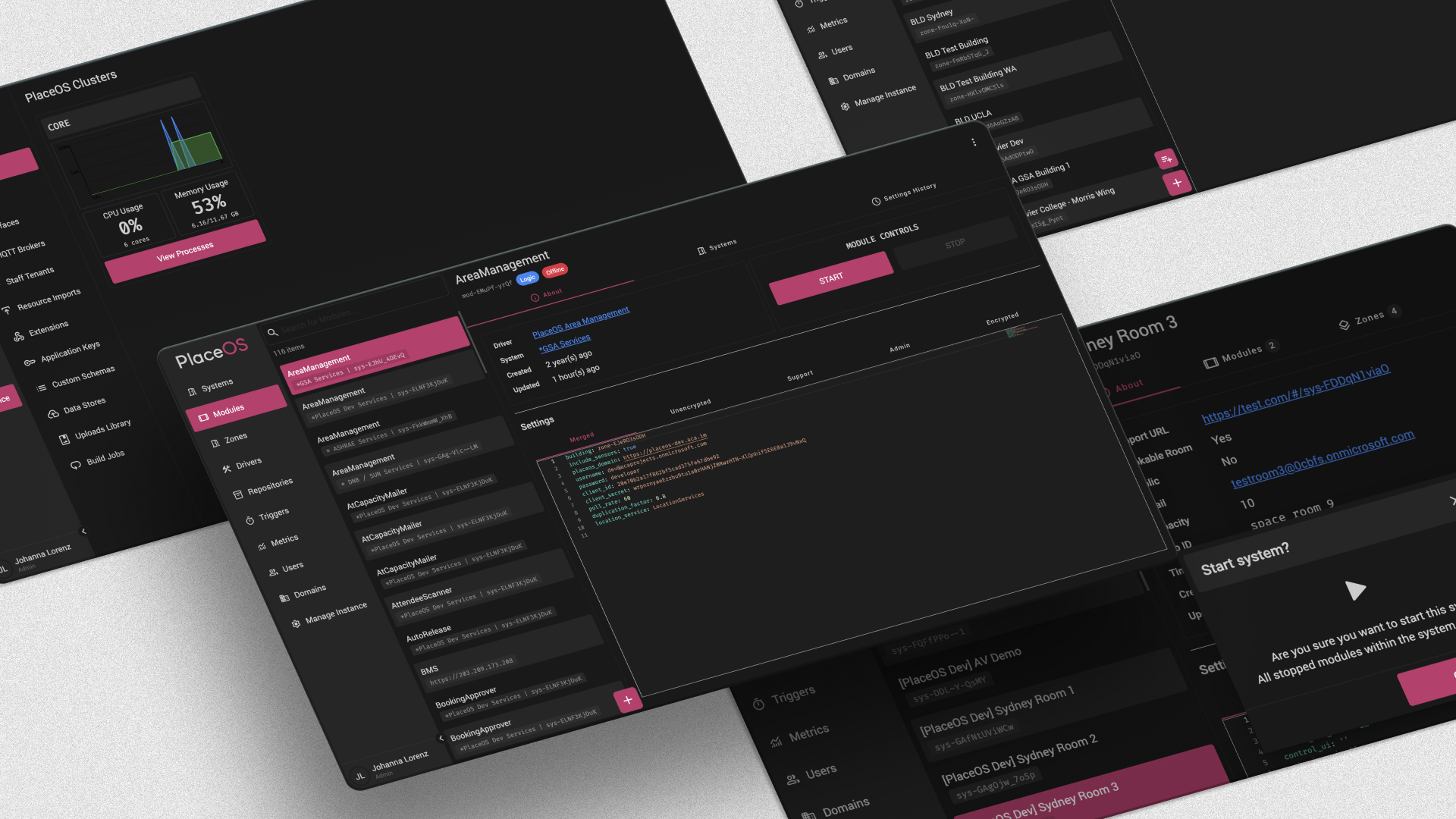
A secure configuration and automation environment for:
- Automation rules and workflows
- Integration and driver management
- System logs, alerts, and administration including remote debugging
- Building and campus-wide configuration templates
This ensures consistency across rooms, buildings, and campuses, while maintaining flexibility where needed.
2.3.4 Studio — Any PlaceOS input to any output

Studio allows ACU to create new workflows in minutes, without software development. It allows you to directly connect PlaceOS drivers in a system - for example, occupancy with automation.
Examples:
- "If room is in teaching mode AND occupancy > 15 → adjust fresh air intake"
- "If event starts → trigger signage + welcome lighting + booking confirmation popup"
This empowers ACU staff to evolve the system over time, rather than depend on vendors.
2.3.5 Build Your Own — Custom Interfaces
Beyond our turnkey applications, PlaceOS provides comprehensive APIs that enable you to create custom-built interfaces tailored to specific user groups and stakeholders.
Why build custom interfaces?
- Stakeholder-specific experiences: Design interfaces optimized for different users — facilities managers see operational dashboards, students see booking and navigation tools, researchers access lab equipment management.
- Shared integration layer: Custom interfaces leverage the same integration drivers and data sources as turnkey applications, ensuring consistency and reducing development overhead.
- Brand alignment: Match ACU's visual identity, terminology, and user experience standards.
- Flexible deployment: Deploy as web apps, mobile apps, kiosks, or embedded within existing systems.
Example: ACU STEM Centre Custom Dashboard
Below is an interactive mockup demonstrating a custom-built interface designed specifically for the STEM Centre. This example shows real-time space occupancy, equipment availability, booking functionality, wayfinding, and visitor management — all powered by PlaceOS APIs and tailored to ACU's brand and workflows.
This mockup demonstrates how PlaceOS APIs can be used to create custom interfaces that integrate real-time building data, calendaring systems, access control, and environmental sensors into a unified experience designed specifically for ACU's needs.
2.4 ACU Technology Integration Strategy
To provide immediate, clear confirmation of our integration capabilities, the following table details our solution for every technology specified in the RFP.
| Category | ACU Specified Technology | PlaceOS Integration Solution |
|---|---|---|
| Network & Location | Cisco Switch Hardware & Wireless APs | Native Integration: PlaceOS Driver for Cisco Spaces (Firehose API). Used for real-time location, occupancy, and path tracking. |
| Building Management | Tridium Niagara AX BMS via BACnet | Native Integration: PlaceOS BACnet Driver. Used to ingest occupancy data from lighting/mechanical sensors and environmental data (temp, humidity, air quality). |
| Identity & Auth | SSO / LDAP | Native Integration: PlaceOS supports SAML 2.0 and LDAP for seamless user authentication against ACU's directory. |
| Calendaring | Outlook / O365 | Native Integration: PlaceOS Driver for Microsoft 365 (Graph API). Provides bi-directional calendar sync for space and resource booking. |
| Collaboration | Microsoft Teams | Native Integration: PlaceOS triggers notifications directly to MS Teams channels or users via webhooks/Graph API for host notification. |
| Academic Timetabling | TimeEdit | Custom Driver: PlaceOS will develop a specific driver to integrate with the TimeEdit API. This will ingest academic schedules, a critical requirement for a university. |
| Access Control | Gallagher | Native Integration: PlaceOS Driver for Gallagher Command Centre. Enables automated visitor access, mobile credentials, and conditional access. |
| Induction System | OnGuard | Native Integration: PlaceOS Driver for LenelS2 OnGuard. Used to query user induction status to enable/disable machinery. |
| LMS | ACU Learning Management System | Custom Driver: PlaceOS will develop a driver for the ACU LMS API to facilitate deeper integration (e.g., linking induction modules). |
| Room Scheduling | Crestron TSS-770-B-S | The PlaceOS Booking Panel App is a hardware-agnostic web app, fully compatible with the Crestron TSS-770 panel's web kiosk mode. |
| Digital Signage | Samsung Tizen & LG WebOS | PlaceOS Digital Signage supports web-standard playback. Needs testing but on paper these platforms are web standard. |
| Payment Gateway | Stripe, PayPal, Square | We have integrated with Stripe in the past. The others can easily be embedded in our web-standard interfaces via their APIs. |
3.0 Detailed Response to RFP Requirements
This section provides a detailed, point-by-point response to every functional and technical requirement.
3.1 Section 2: Occupancy Sensing
PlaceOS Approach:
Instead of relying on a single sensor type, PlaceOS delivers a "fused data" solution that leverages all available infrastructure as requested in Section 2.2.4 of the RFP. We will ingest and "fuse" data from:
- Cisco Wi-Fi Network: To provide broad, anonymized location and count data.
- Tridium BMS: To pull "occupied/unoccupied" data from existing mechanical and lighting (PIR) sensors.
- AV Cameras: To provide highly accurate, granular "people counting" data via API integration.
Any single data source has flaws: Wi-Fi is not precise to a single seat, PIR sensors only detect motion (not count), and cameras can have privacy implications. By fusing all three, the PlaceOS logic engine can determine true occupancy with high accuracy.
Adding additional sensors - only if and when needed
The IT, AV, Security, and Building networks all have sensing capabilities. Once connected, we can start assessing data quality and matching specific requirements. If there are blind spots or a need for highly accurate tracking, we can recommend our sensing partner Calumino—a heat-sensing solution with on-chip computer vision for detailed tracking. It's low cost and can run on the building's lighting network for easy integration. Additionally, PlaceOS is entirely hardware-agnostic; we have many sensor integration drivers and can integrate with any sensor you or PW recommend.
| Requirement | Summary | Compliance | Proposed Solution |
|---|---|---|---|
| 2.2.1 | Real-Time Occupancy Data | Fully Compliant | PlaceOS provides real-time occupancy dashboards. We deliver both "occupied/unoccupied" data (from BMS/PIR sensors) and granular "people counting" (from integrated AV cameras and/or Cisco Wi-Fi triangulation). |
| 2.2.2 | Historical Data | Fully Compliant | All occupancy data is ingested into a time-series database (e.g., InfluxDB) for historical analysis, trend reporting, and export. |
| 2.2.3 | Occupancy Heat Maps | Fully Compliant | The PlaceOS Area Manager module is our dedicated tool for this. It allows administrators to plot all sensors onto floor plans and generate real-time and historical heat maps to visualize usage patterns. |
| 2.2.4 | Integration with Building Sensors | Fully Compliant | This is a core strength. PlaceOS will integrate directly with the specified Tridium Niagara AX BMS via BACnet and the AV cameras via their API. |
| 2.2.5 | Environmental Metrics | Fully Compliant | PlaceOS will ingest temperature, humidity, and air quality (CO2) data directly from the Tridium Niagara AX BMS driver. This data is displayed in the Workmate app and can be used in automation logic. |
3.2 Section 3: Journey Mapping and Analysis
PlaceOS Approach:
This is a direct extension of our Occupancy solution. By leveraging our native integration with the Cisco Spaces platform, we ingest the real-time, anonymized location data from ACU's Wi-Fi access points. This allows for powerful analysis of movement, dwell time, and congestion.
| Requirement | Summary | Compliance | Proposed Solution |
|---|---|---|---|
| 3.2.1 | Path Tracking | Fully Compliant | Using the Cisco Spaces Firehose API, PlaceOS ingests a live feed of anonymized device locations. This data is used to analyze common journey pathways and user flows throughout the STEM CEE. |
| 3.2.2 | Dwell Time | Fully Compliant | By analyzing the time-series data from the path tracking solution, our analytics engine calculates occupant dwell time in specific, pre-defined zones. |
| 3.2.3 | Behavioural Insights | Fully Compliant | PlaceOS aggregates this pathing and dwell time data to provide actionable insights into building usage, such as identifying heavily used paths, areas of congestion, and underutilized spaces. |
3.3 Section 4: Visitor Management
PlaceOS Approach:
Visitor Management is a core, out-of-the-box feature of our PlaceOS Workmate application. It is fully integrated with O365 and MS Teams to provide a seamless journey from pre-registration to host notification.
| Requirement | Summary | Compliance | Proposed Solution |
|---|---|---|---|
| 4.2.1 | Pre-registration | Fully Compliant | Hosts can pre-register guests via the Workmate app or directly from their Outlook/O365 calendar. The guest receives a branded email invitation with a QR code, campus map, and links to any required inductions or NDAs. |
| 4.2.2 | Check-in | Fully Compliant | Guests can check in by scanning their QR code at a visitor management kiosk or on their personal mobile device. |
| 4.2.3 | Ad hoc Registration | Fully Compliant | Unregistered guests can use the same touch-capable kiosk (or QR code link) to complete a customizable registration form. |
| 4.2.4 | Host Notification | Fully Compliant | Upon guest check-in, PlaceOS triggers an automated, real-time notification to the host via Email, SMS, and Microsoft Teams. |
3.4 Section 5: Wayfinding
PlaceOS Approach:
We deliver a best-in-class wayfinding experience within the PlaceOS Workmate app by integrating MapsIndoors, a world-leading indoor mapping provider. This solution is built on Google Maps, providing a familiar user experience, and leverages the Cisco Wi-Fi network for real-time indoor positioning.
| Requirement | Summary | Compliance | Proposed Solution |
|---|---|---|---|
| 5.2.1 | Interactive Maps | Fully Compliant | Via our MapsIndoors integration, we provide beautiful, interactive 2D and 3D maps accessible on mobile devices (via Workmate app) and digital signage kiosks. |
| 5.2.2 | Directions | Fully Compliant | The solution provides true outdoor-to-indoor, turn-by-turn navigation, guiding a user from their home directly to a specific room or resource within the STEM CEE. |
| 5.2.3 | Accessibility Features | Fully Compliant | The wayfinding module supports accessible routing, allowing users to request paths that use elevators and ramps, avoiding stairs. The app interface also supports high-contrast maps and voice-guided navigation. |
3.5 Section 6: Resource Management
PlaceOS Approach:
This functionality is provided by the Asset Manager and booking modules within PlaceOS Workmate. It allows ACU to digitize its entire library of bookable resources (equipment, studios, 3D printers, cameras) and manage them through a single, reportable system.
Payment Gateway Integration
A key requirement is the integration of a payment gateway (Stripe, PayPal, Square). PlaceOS, as an integration platform, is perfectly architected for this. We will develop a custom driver for the Stripe API. The booking workflow is as follows:
- A user selects a paid resource (e.g., "3D Printer - 4 hours") in the Workmate app.
- PlaceOS calculates the cost and opens a secure iframe (using Stripe.js) for payment.
- The user enters their details directly into Stripe's secure environment. Stripe processes the payment and sends a confirmation token back to PlaceOS.
- The PlaceOS logic engine receives the token and confirms the booking.
This workflow is fully PCI-DSS compliant, as ACU's servers (and PlaceOS) never touch, handle, or store the raw credit card data.
3.6 Section 7: Space Management
PlaceOS Approach:
This is a cornerstone of the PlaceOS platform. The primary challenge for any university is the "dual-calendaring" problem: the official academic timetable (in TimeEdit) and the ad-hoc staff meeting calendar (in O365) are separate, leading to booking conflicts.
PlaceOS is uniquely positioned to solve this at the integration layer.
- Our TimeEdit driver will pull all academic bookings from the TimeEdit API.
- Our O365 driver will pull all staff bookings from the Microsoft Graph API.
- The PlaceOS Logic Engine fuses these two calendars into a single, unified availability view for every room.
3.7 Section 8: Building Experience
PlaceOS Approach:
This section is the PlaceOS solution. The PlaceOS Workmate app is the "Building Experience" solution the RFP describes. It is the single, unified mobile/web application that provides the interface for Wayfinding, Booking, Visitor Management, and all the advanced integrations.
Smart Machinery Workflow Example
A critical and unique requirement is the "Smart Machinery" workflow (Sec 8.2.8), linking the LMS, the OnGuard induction system, and machinery eStops. This is a perfect demonstration of the PlaceOS automation engine:
- A student (user) enters a workshop and wants to use a 3D printer (a bookable resource from Sec 6).
- They scan a QR code on the machine with their Workmate App.
- PlaceOS receives the request. It then makes an API call to the LenelS2 OnGuard driver to ask, "Is this user certified for '3D Printer Safety Induction'?"
- OnGuard (or the integrated LMS) replies "Yes, completed 10/10/25."
- The PlaceOS logic engine proceeds, sending a command to an IoT-connected relay, which enables the machine's eStop/power. The student can now use the machine.
- If OnGuard replies "No," the Workmate app informs the user and provides a direct link to the ACU LMS module to complete the induction.
This is a seamless, automated, and auditable safety workflow that connects four disparate systems.
3.8 Section 9: Content Management System
PlaceOS Approach:
We will deliver our dedicated PlaceOS Digital Signage platform. This is a modern, web-based CMS designed for creating, managing, and scheduling content across a large and diverse network of displays.
The RFP mandates support for Samsung Tizen and LG WebOS System-on-Chip (SoC) platforms. Our playback is via standard HTML, so as long as these platforms support this, our content can display. Each display gets a unique URL. For ChromeOS-based players, we can manage this via a Google Sheet or MDM software. For your Samsung and LG platforms, we would need you to test deploying the URLs and that web playback works fine on these devices.
4.0 Integration, Management, and Support
PlaceOS confirms our ability to meet all requirements for integration, management, and support.
4.1 Interfacing with ACU Infrastructure
Our driver-based architecture is designed specifically to interface with a complex, multi-vendor environment like ACU's.
4.2 Multi-Tiered User Permissions
The PlaceOS platform provides granular, multi-tiered Role-Based Access Control (RBAC) across all modules. We will configure roles as specified (e.g., User, Staff, Researcher, Operational IT Support, Administrator) with distinct permissions for viewing data, booking resources, and configuring systems.
4.3 SSO/LDAP Integration
PlaceOS fully supports SAML 2.0 and LDAP integration. We will configure the platform to authenticate against ACU's Active Directory, providing a seamless and secure single sign-on experience for all staff and students.
4.4 Support and Maintenance Plan
PlaceOS provides a comprehensive support agreement.
Remote Support Service Desk
Our global support desk is managed via our portal (support.place.technology) and email (support@placeos.com). Critically, our Australian engineering and support team is based locally in Sydney at the University of Sydney's Knowledge Hub. This provides expert support within ACU's time zone.
Preventative / Predictive Maintenance
Our platform provides proactive monitoring of all integrated systems. The support plan includes all platform updates, security patches, and predictive analytics (e.g., "Sensor XYZ has stopped reporting").
Training and Change Management
A successful deployment requires user adoption. Our proposal includes a comprehensive training package for ACU's IT support staff ("train the trainer") and change management resources (e.g., user guides, videos) for staff and students.
4.5 Cybersecurity Adherence
PlaceOS confirms our adherence to all ACU cybersecurity policies. We welcome and will fully cooperate with the client security team's evaluation as requested. Our architecture is flexible and can conform to your requirements, including deployment in your environment. For more info please review our tech docs at https://docs.placeos.com/placeos/reference/security-compliance/faq/
5.0 Proven Success: The PlaceOS Smart Campus
5.1 Addressing the RFP Requirement
Section 10 of the RFP requests "Case studies or references from existing clients, particularly those based in Australia or with Australian support teams". We are uniquely positioned to meet this.
5.2 The University as a "Smart City"
PlaceOS is uniquely suited for the higher education environment. A university campus is a complex ecosystem of diverse stakeholders (staff, students, researchers, visitors, facilities managers, IT) and diverse spaces (workplaces, labs, lecture halls, public venues, retail). The PlaceOS "Smart Campus" blueprint is designed to unify this complexity.
5.3 Flagship Higher Education Case Study: UCLA
PlaceOS has a multi-year strategic product development alliance with UCLA. We are working with their audiovisual design and support division (Digital & Technology Solutions) to transform how students, faculty, and visitors interact with UCLA's physical spaces. This collaboration focuses on creating intelligent, data-driven, and highly personalized experiences—a vision that directly aligns with ACU's goals for the STEM CEE. This reference provides irrefutable proof of our capability in a world-class university setting.
5.4 Australian Presence and Support
PlaceOS is an Australian company, headquartered in Sydney. Our office is located at the Sydney Knowledge Hub, University of Sydney. We are not just an Australian reseller; we are an Australian technology partner embedded within the local university ecosystem. This provides ACU with unparalleled local access to our core engineering and support teams.
Our Leadership Team - All Ex-University Employees:
- Jonathan McFarlane - CEO - Ex University of Sydney
- Stephen Von Takach - CTO - Ex University of Sydney
- Jeremy West - Director of Product - Ex Deakin University
- William Le - Director of Delivery - Ex University of Sydney
6.0 Implementation, Commercials, and Proof of Concept
6.1 Implementation Timeline
We propose a collaborative, phased implementation to de-risk the project and ensure a successful launch, based on our proven 6-8 week deployment model.
Phase 1 (Weeks 1-2)
Discovery and Platform Deployment
- Stakeholder workshops with Pereira Wilson and ACU teams
- Finalization of all integration points and logic workflows
- Deployment of the PlaceOS Core Platform
Phase 2 (Weeks 3-5)
Core Integration and Configuration
- Configuration of native drivers: O365, Cisco Spaces, Tridium (BACnet), Gallagher, OnGuard (LenelS2), and SSO/LDAP
- Deployment of PlaceOS Workmate and Digital Signage SaaS platforms
Phase 3 (Weeks 3-6)
Custom Driver Development
- Parallel development and testing of custom drivers for the TimeEdit API and the Stripe Payment Gateway
Phase 4 (Week 7)
User Acceptance Testing
- ACU and Pereira Wilson teams test all workflows
- Testing scenarios include room booking, visitor check-in, payment processing, and more
Phase 5 (Week 8)
Go-Live and Handover
- Phased rollout to users
- Delivery of administrator training and user documentation
6.3 Availability for Proof of Concept (POC)
PlaceOS confirms our availability to provide a proof of concept as requested.
We can host a PoC environment and connect, provide our turn-key interfaces and existing integration drivers for the PoC project. Then use this project to scope any required customisations.
6.2 Pricing Model (CAPEX and OPEX)
A. Capital Expenditure (CAPEX) - One-Time Fees
| Services | $2,000 per day |
| Delivery, installation, and configuration. Excludes custom interfaces, floor plan design or anything beyond basic PlaceOS deployment. | |
| Estimated Implementation Services | $30,000 (one-time) |
B. Operational Expenditure (OPEX) - Annual Recurring Fees
| PlaceOS Platform License (Core) | $45,000 per year |
| Includes all turn-key products. Anything new will be a customisation service. | |
| Digital Signage | $300 per display per year |
| Wayfinding | Quote required |
| Cost per floor per year (Need total numbers to work with our wayfinding provider on quote - it integrates into PlaceOS solution). | |